Renderer Mode
Usage
- Write LaTeX source in editor above
- Click “Generate” button on sidebar
- Copy & paste generated image or download .eps .svg files
Editor Shorcuts
| Generate | Ctrl+S | Copy | Ctrl+C |
| Find | Ctrl+F | Paste | Ctrl+V |
| Cut | Ctrl+X | Replace | Ctrl+H |
Tips
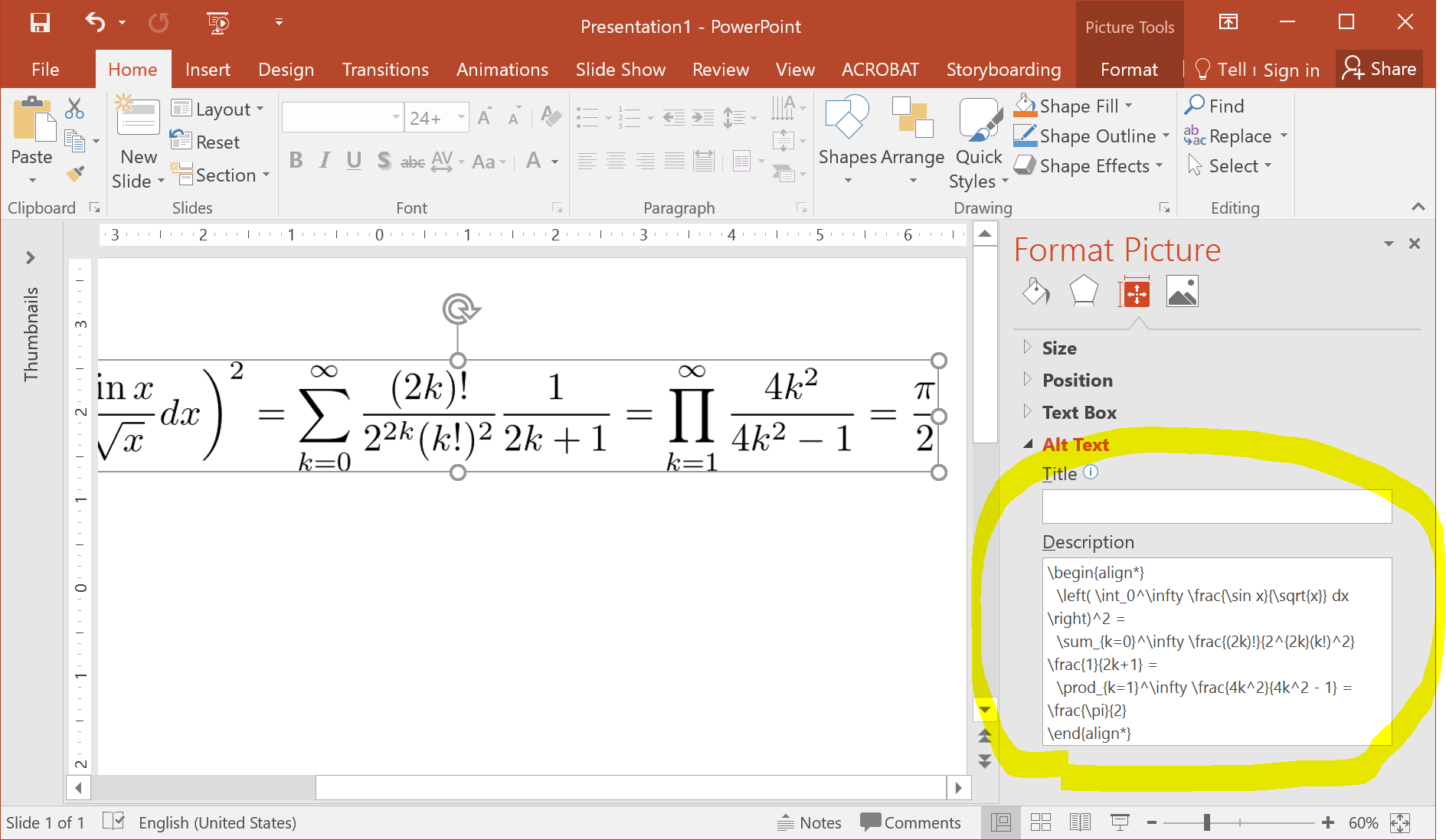
- You can retrieve TeX-code from images pasted in PowerPoint (see this).
- At every image generation, LaTeX source is stored in browser history. Use browser Back / Forward button or history window to retrieve them.
- Click color palette while selecting text to color the text
- Multiple cursor/selection is available by Ctrl + click/drag
Disclaimer
- TeXclip is provided “as is”, without warranty. Use at your own risk.
- Please avoid direct linking to images, due to server load, privacy concerns, and inability to guarantee image permanence.
Acknowledgments
TeXclip depends on many open source projects. While it is difficult to list enormous number of the projects on which TeXclip depends, I especially would like to acknowledge TeX Live / dvipng (Image generation) / Ghostscript (EPS generation) / dvisvgm (SVG generation) / Ace (online code editing).
TeXclip is developed and maintained by Ichiro Maruta.